Five pieces. Five cards. One perfect move. Choose how you want to enter the duel.
LAN party readyChoose a duel. Start in seconds.
Same Wi-Fi
Online players
Looking…
Solo difficulty & more
No games yet0
Two phones. One Wi-Fi.
Private by default, with each player viewing the board from their side.
Same Wi-Fi
Online players
Looking…
Game in progress
Return to your saved seat in the private lobby.
Games on this Wi-Fi
Enter your name above, then tap Join Lobby.
Start together
Connect both phones to the same Wi-Fi. One hosts; the other joins.
or join the host
The hosting device must keep Sakura open during the match.
Internet Rooms
Optional public matches for when your opponent is not nearby.
How to play / Your first duel
Learn Sakura in three moves
You command one Dojo Master and four Disciples. Move with cards, capture opposing pieces, and protect your Master.
What you start with
5 piecesOne Master and four Disciples.
2 cardsEither card may move any of your pieces.
1 shared cardThe pool card changes after every move.
On your turn
01
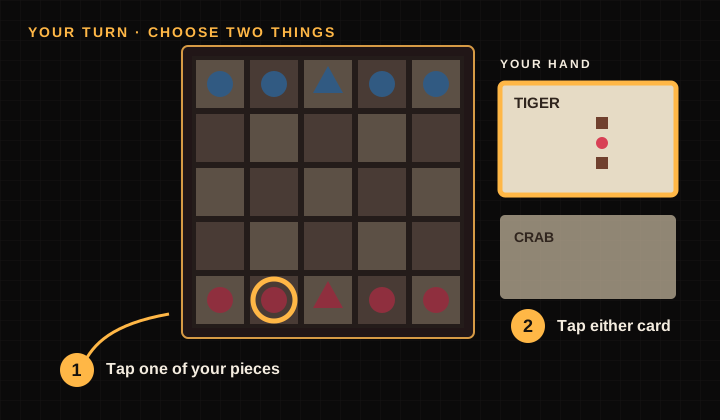
Select a piece, then a card
Tap your Master or a Disciple. Then tap either movement card in your hand. You can change either choice before moving.
02
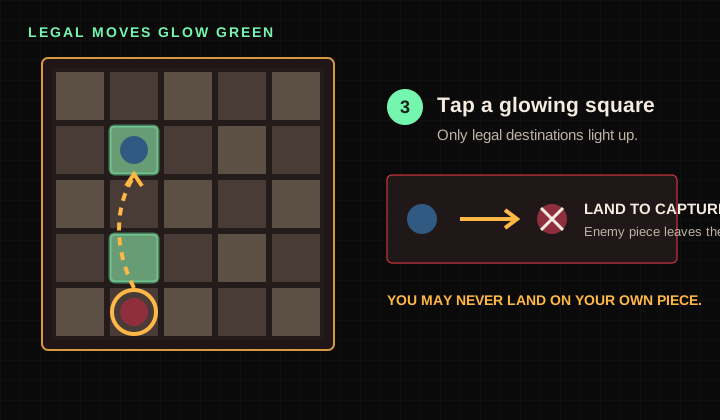
Move to a glowing square
Tap one green destination. Landing on an enemy captures it. You cannot land on one of your own pieces.
03
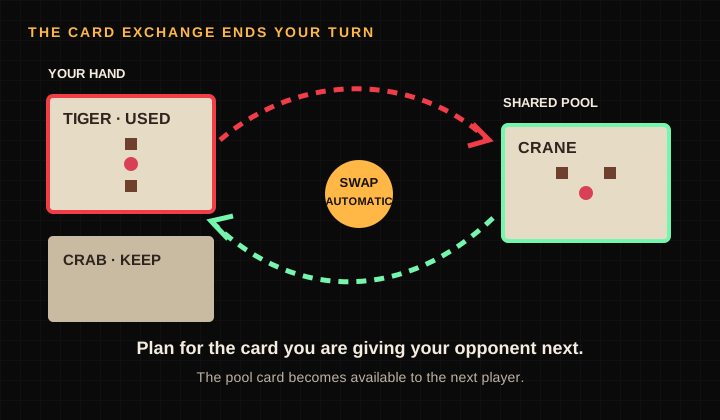
Your used card swaps automatically
The card you played enters the pool. The old pool card enters your hand, then the other player takes their turn.
Two ways to win
ACapture the rival MasterLand your Master or any Disciple directly on the opposing Master.
BEnter the rival templeMove your Master—not a Disciple—onto the marked temple square across the board.
How to read a movement card
The pink center dot is your selected piece. The brown squares are its possible destinations. Read every card from your side of the board—forward always points toward your opponent.
Important: cards describe a movement shape, not a specific piece. Either card can move your Master or any Disciple.
Playing together?Pass & Play tells you when to hand over the device and flips the board after each turn. On two phones, each player always sees their own pieces at the bottom.
Game settings
Saved on this device.
Install Sakura
Keep the game one tap away.
Open your browser menu and choose Install app or Add to Home Screen.
Installed Sakura supports solo and pass-and-play offline. Network matches still need a connection to their host.
Leave this match?
Your current game will be lost.
Your First Duel
Step 1 of 5
一
Choose a warrior
Select your Master or one of your four Disciples. Glowing squares show where it can move.
Watching the duel
The two players control the board.
Stay and watch, or return to the room list to find another seat.
Duel room
Waiting for an opponent…
The duel begins when both players are ready.
Lobby Cards
Custom cards live only in this private lobby.
Selected Cards
Offline · Solo and local play still work
The match hit a snag
Your local settings are safe. Reload the game to recover.